
Screens & Line Screens in Flexo
A gradient that fades smoothly, a detail that remains visible in a dark image, a solid color that prints evenly: these results are prepared from the platemaking stage.
The screen organizes the dots that form the printed image. Line screen determines their frequency in a conventional screen. Their selection must take into account the artwork, the substrate, and the actual printing conditions.

1. One image, four areas to control
A screen must preserve tonal variation throughout the image, from highlights to solid areas.
Highlights: holding the first tonal values
In reflections and gradients fading to white, the smallest dots must remain reproducible to avoid visible breaks.
Midtones: maintaining balance
Dot gain during printing can darken images and shift colors. Compensation curves are adjusted to the actual behavior of the printing press.
Shadows: preserving detail
In dark areas, the non-printing spaces must remain open in order to retain tonal variation and fine detail.
Solids: ensuring even coverage
A solid area must be uniform and its color controlled. Its quality should be assessed through both visual inspection and measurement, not density alone.
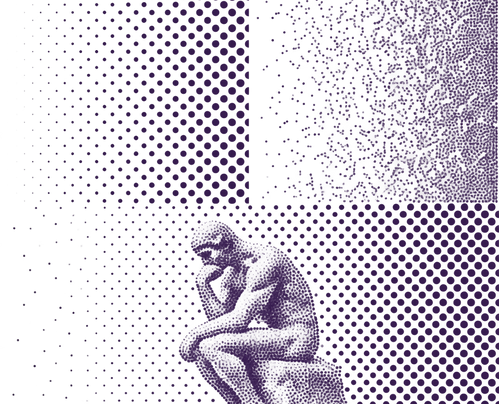
2. AM, FM and hybrid screening: how tonal values become dots
AM and FM describe how dots are organized, independently of the plate, imaging resolution, or ink.
Why use a hybrid transition?
In very light areas, some screening technologies maintain a minimum dot size while adjusting dot distribution to achieve a smoother fade toward white.
FM does not refer to a single construction
In first-order FM screening, dot size remains constant while the number of dots varies. Other FM families may also modify the way dots are grouped.
What about moiré?
Interactions between screens, artwork patterns, and the anilox can create unwanted interference patterns. In AM screening, screen angles help control them. FM screening avoids the regular rosette structure, but the final result must still be verified.
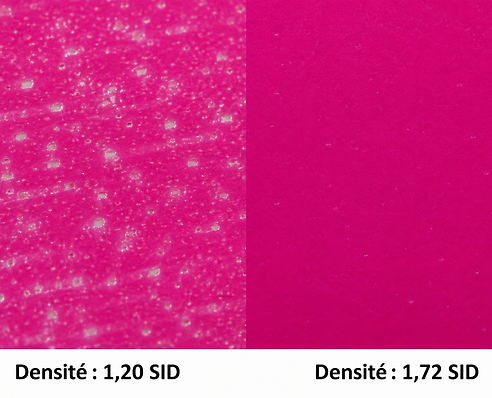
3. Solid-area micro-screening: improving ink transfer
A solid area is a fully covered printing zone. Micro-screening creates a very fine surface structure on the plate in order to influence ink transfer and distribution, unlike conventional screening, which creates tonal variations within an image.
Why structure a solid area?
An appropriate surface texture can improve ink laydown uniformity and, under certain conditions, increase optical density. The result depends on the ink-substrate combination, the plate, and the inking conditions.
Higher density does not necessarily mean more ink
Higher density may result from better ink distribution. Density alone cannot determine whether more ink is being deposited or whether ink consumption has been reduced.
Three measurements that should not be confused
Density measures the optical response of the printed ink. ΔE00 measures the color difference from a reference. Opacity measures covering power, particularly for white ink on transparent film. These three indicators should be evaluated separately.
Check the details around the solid area as well
Knockout text, fine elements, and transitions must also be checked. A very dense solid that closes small reverses is not necessarily the best compromise.
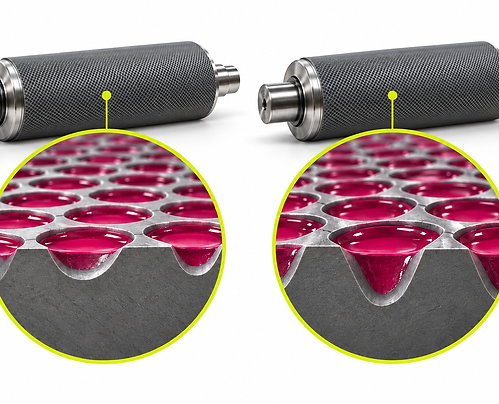
4. The anilox: beyond line count
The same configuration cannot automatically be transferred from one press or substrate to another. Before selecting a screen, it is important to identify the defect to be avoided and the actual printing conditions in which the plate will operate.
Two anilox rolls with the same line count can have different cell volumes and cell geometries. Their condition and cleanliness also affect ink transfer.
When preparing a technical evaluation, specify the anilox line count, volume and unit, and, when known, the engraving geometry. A single numerical ratio between plate screen and anilox line count cannot replace this information.